Monday, September 3, 2012

Method Callers in Xcode 4.4


I love that I can see the callers of a method in Xcode!

From the Find and Search Additions section of the New Features in Xcode 4.4 documentation, it says:

"...function is accessed from the Show Related Items menu, or by using the Assistant editor and selecting Callers or Callees in the jump bar pop-up menu..."
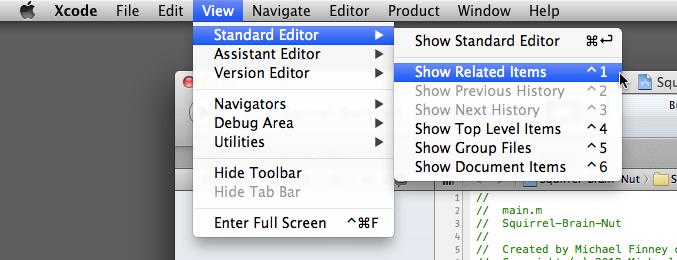


So how does one easily popup the Show Related Items menu? Press Control-1 aka ^1 and you will see "Callers(x)" where x = the number of methods calling the method.


There is also the comprehensive Xcode Keyboard Shortcuts and Gestures documentation which covers multi-touch gestures and other shortcuts.

Enjoy this feature while you explore your code!

Wednesday, August 22, 2012

gitflow and the Apple Store

I have started using gitflow with my iOS (iPhone / iPad) development work. If you want to know why one should use gitflow, read Why Aren't You Using git-flow?

A Getting Started - Git Flow tutorial was helpful, especially in the "git flow release" section. One question arises quickly is: When should I do the command git flow release finish?

The answer lies in the following text that comes from the tutorial: "..and your operations team has deployed the Release Candidate to Production..."

In this case, Apple has taken care of releasing the candidate to production through the App Store. Apple is our "operations team." Once the application is available for download from the App Store, you can perform the git flow release finish command. 

The example from the tutorial is: git flow release finish -F -p Version_1.0

To sum up, adding gitflow to your workflow is simple. It makes managing your code fun all the way to the App Store! 

Wednesday, July 11, 2012

Power With LLDB Objective-C Debugger

I have come to realize there is a huge and powerful tool called the LLDB debugger which is used by Objective-C programmers now instead of gdb. In the past, I have used some of the commands of the gdb debugger, however this map at
http://lldb.llvm.org/lldb-gdb.html shows me a wonderful number of things at my disposal that I never knew existed in gdb.

The current command of interest is the replacement for gdb's info symbol command which shows "information for a raw address in the executable or any shared libraries"
(gdb) info symbol 0xa0b06174
That replacement in lldb is image lookup
(lldb) image lookup --address 0x1ec4
I highly recommend all Objective-C programmers skim http://lldb.llvm.org/lldb-gdb.html aka The LLDB Debugger command map and smile at all that you have available!


Update:

We ended up switching back to gdb. 


We were able to see the offending code once we switched back to gdb from lldb and applied what we could from http://coderslike.us/2009/05/05/finding-freeddeallocated-instances-of-objects/


The solution to the memory issue was:
  • create a UIColor
  • store that in a variable such as someUIColor
  • pull out from someUIColor.CGColor the CGColorRef and pass that on to whatever needs it

It seems that doing something like this is bad in ARC and one should use UIColor (which is an NSObject):

CGColorRef crashingColor = [[UIColor colorWithRed:1 green:1 blue:160.0/255.0 alpha:1] CGColor];

Friday, April 13, 2012

iOS and Threads


While watching the Free Stanford Class Videos About iOS, iPhone, iPad, Objective-C and Xcode, I came across the Blocks and Multithreading lecture.

It does a great job of describing how to avoid locking up the user interface (iPhone or iPad) while the application needs to do something that is time intensive.

In general, one would call the following things in their proper context.

    dispatch_queue_t downloadQueue = dispatch_queue_create("widget download", NULL);
    dispatch_async(downloadQueue, ^{
        
        NSArray *fetchedWidgets = [KTWidgetFetcher widgets];
        NSLog(@"done fetching widgets");

        dispatch_async(dispatch_get_main_queue(), ^{
            
            NSLog(@"UI update is happening");
            self.widgets = fetchedWidgets;
        });
        
    });
    dispatch_release(downloadQueue);

Fun stuff!

Sunday, April 1, 2012

Frames vs Bounds in UIView

In the context of UIView of the iOS, I came across frame and later came across bounds. To the casual observer, one may think they are the same. They are not.

I like how this stack overflow user, amattn, puts it in his post:


Here's the cheatsheet:

    • frame is where the view is (with respect to the superview)
    • bounds is where the view is allowed to draw (with respect to itself)

Also, 40 minutes and 50 seconds into the "4. Views (October 6, 2011) - HD" lecture by Stanford, discusses the difference in depth using a drawing which really helps. 


Saturday, March 24, 2012

Free Stanford Class Videos About iOS, iPhone, iPad, Objective-C and Xcode


Now there are free videos from the Stanford University School of Engineering about iPhone, iPad, iOS, Xcode, and Objective-C !

The Stanford class is known as CS 193P iPhone Application Development

Credit goes to Rebecca Case for pointing them out to me, Mike Finney.

You can watch them using iTunes / iTunes U. They are wonderful to watch and make me smile!

I hope you love them too!

Sunday, August 21, 2011

Smart Caffeine

In taking a quick WebMD quiz about caffeine ( Quiz: Myths and Facts About Caffeine ), I read in the 2nd question that 200 mg to 300 mg of Caffeine is considered safe for most adults.

Green Tea has health benefits and a little caffeine (about 26 mg for 180 ml aka 6 fl 0z) .   Compare that caffeine to a cup of coffee (about 145 mg of caffeine).

So, green tea is on my radar and I will switch to it soon.

My current favorite drink has about 108 mg per 24 oz. So, I can have about 2 1/2 bottles of that safely.

If I switch to green tea, I can drink how many cups?  It's about the same. 24 oz of brewed green tea is about 104 mg of caffeine.  :)

If I want to push the limits of safe, I can have 400mg of caffeine according to an ABC News webpage.

Raise your glass and let's drink to good health and productivity!